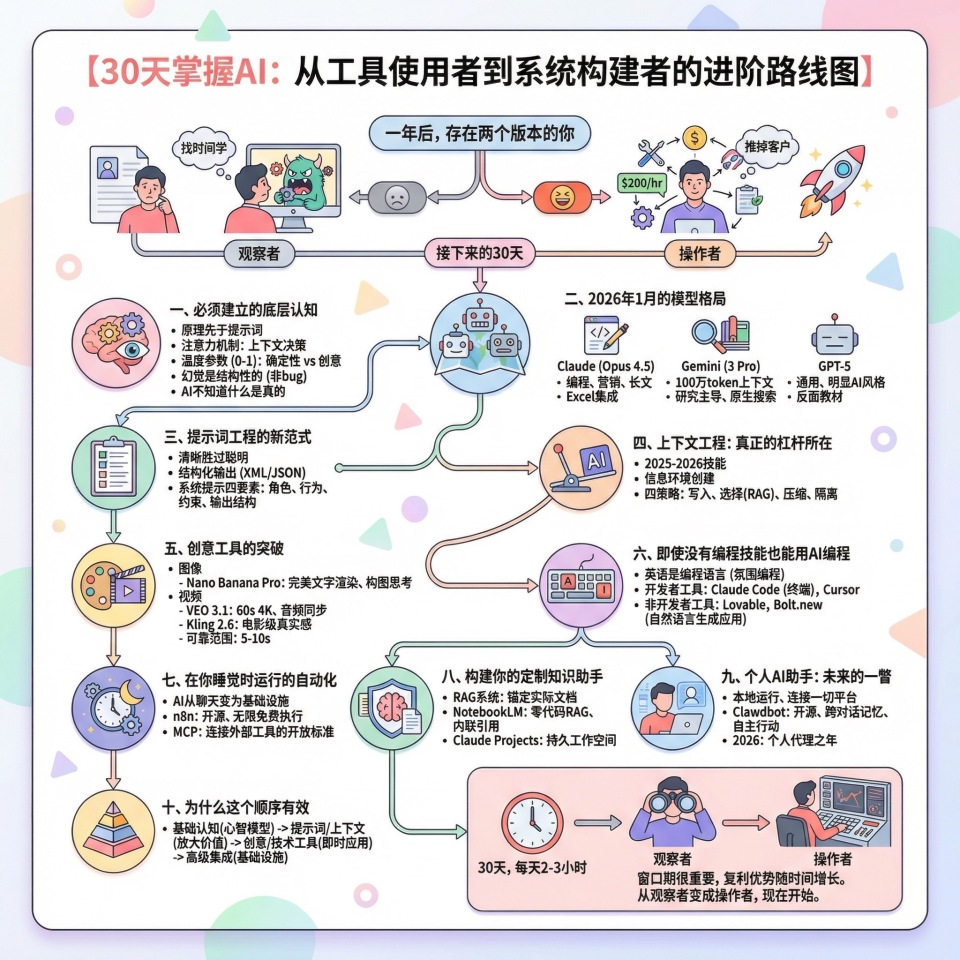
一年后,存在两个版本的你。
一个还在用千篇一律的简历海投,眼睁睁看着AI蚕食自己的行业,总想着“找时间”学这些东西。另一个已经能以每小时200美元的价格承接AI落地项目,构建半年前还不存在的工具,因为需求太旺盛而不得不推掉客户。
起点相同,轨迹迥异。而这个分叉,就发生在接下来的30天。
这套课程体系叫做“操作者工具包”,核心在于按照能力复利最大化的顺序构建AI技能,每个阶段都为下一阶段解锁新能力。30天后,你将不再只是使用AI,而是把它部署成基础设施。
一、必须建立的底层认知
大多数AI教育一开始就错了。它们在你理解原理之前就教你提示词技巧,结果你只会复制模板,无法随机应变。
当你输入“the bank was steep”时,模型需要做一个决策:你说的bank是“银行”还是“河边”?注意力机制通过权衡哪些周围词汇最重要来解决这个问题。它不断在问“什么上下文能帮我理解这个词?”这个简单的洞察解释了80%的提示词效果差异。给模型清晰的上下文,它就能做出更好的决策;让它缺乏上下文,它就只能猜测。
温度参数控制随机性,范围从0到1。设为0时模型每次给出最确定的答案,设为1时它会冒险尝试创意。事实查询用低温度,需要意外想法时调高。这个参数区分了令人沮丧的AI对话和高效的AI对话,但大多数人从不调整它。
还有一个反直觉的事实:AI不知道什么是真的。它根据模式预测下一段文字可能是什么,而自信的文字模式既存在于事实中也存在于虚构中,所以模型以同样的自信产出两者。研究显示近一半AI生成的引用是部分或完全捏造的。解决方案不是等他们修复,幻觉是结构性的,不是bug。
二、2026年1月的模型格局
“最好的”模型取决于你在做什么。用错模型就像用螺丝刀当锤子,技术上可行,但令人沮丧且效果欠佳。
Claude在三个领域领先:编程方面,Claude Opus 4.5在基准测试和社区反馈中都是最佳选择;营销和长文写作方面,Claude对品牌调性和细微差别的理解优于其他选项;电子表格和商业分析方面,新的Claude Excel集成能处理多标签工作簿,解释带单元格引用的计算,修复公式错误。
Gemini 3 Pro凭借100万token的上下文窗口主导研究领域。你可以上传整个研究语料库、完整代码库、数月的会议记录,Gemini在回答问题时保持全部上下文。加上原生谷歌搜索集成,它能获取当前信息而非对训练截止后的变化产生幻觉。
GPT-5则是一个有用的反面教材。它持续产出最通用、最明显的AI风格输出。把同一个提示词分别输入Claude、Gemini和GPT-5,你会立刻认出GPT的输出,它有一种难以描述但一眼就能看出的平淡。
三、提示词工程的新范式
忘掉那些花哨技巧。游戏规则变了,清晰胜过聪明。获得结果的人写的提示词读起来像好的简报,而非魔法咒语。
Claude用XML标签训练,对这种结构响应极好。GPT和Gemini在需要结构化数据返回时用JSON效果好。格式不是魔法,而是给模型关于你想要什么的清晰信号。
有效的系统提示包含四个要素:角色、行为方式、约束条件、输出结构。一个好的系统提示能把通用AI转化为针对你特定工作流的专业助手,一旦建好就能复用数百次。
四、上下文工程:真正的杠杆所在
提示词工程是2024到2025年的技能,上下文工程是2025到2026年的技能。这个转变认识到,单个提示词的重要性不如你围绕AI交互创建的信息环境。
Shopify CEO Tobi Lutke将其定义为“提供所有上下文使任务能被大语言模型合理解决的艺术”。
四个策略:写入,将上下文保存在活动窗口之外;选择,通过RAG和动态检索选择进入上下文的内容;压缩,在包含之前总结冗长信息;隔离,为不应混合的不同上下文使用单独的对话线程。
五、创意工具的突破
图像生成方面,Nano Banana Pro完成了跨越式发展。它实现了完美的文字渲染,多年来AI图像无法正确拼写的问题终于解决。它在渲染前会思考你的场景,考虑构图、光线和主体关系。提示时像给摄影师做简报一样描述你想要的结果。
视频生成方面,VEO 3.1提供最完整的方案:原生音频生成、同步对话和音效、最长60秒、4K输出。Kling 2.6则在电影级真实感方面表现出色。但要知道,5到10秒是可靠范围,每个可用片段预计需要3到10次尝试。
六、即使没有编程技能也能用AI编程
英语现在是一种编程语言。Andrej Karpathy称之为“氛围编程”,你描述想要什么,AI生成代码,你运行并观察,然后根据结果迭代。
开发者用Claude Code和Cursor。Claude Code在终端运行,能读取整个代码库、进行多文件编辑、运行测试、自主创建提交。非开发者用Lovable和Bolt.new,从自然语言描述生成完整的网页应用。
七、在你睡觉时运行的自动化
这是AI从聊天工具变成基础设施的地方。n8n是开源且可自托管的,有无限免费执行次数。Claude Code能从自然语言描述生成n8n配置。MCP是让AI系统连接外部工具和数据源的开放标准,实现一次就能让你的AI与各种服务对话。
八、构建你的定制知识助手
RAG系统将AI响应锚定在你的实际文档而非训练数据上,这解决了领域特定问题的幻觉问题。
NotebookLM是零代码RAG方案,上传文档后系统就成为该内容的专家,带有内联引用。Claude Projects创建持久工作空间,上传的文档在每次对话中都可访问。
九、个人AI助手:未来的一瞥
我们正在见证AI助手的诞生,它们完全在你的硬件上运行,连接你使用的每个平台,记住一切,并自主采取行动。
Clawdbot是一个开源项目,它能连接WhatsApp、Telegram、Slack等平台,拥有跨对话的持久记忆,能读写文件、控制浏览器、执行脚本,甚至构建自己的扩展。更关键的是,它能编写代码来扩展自己的能力。
2026年是个人代理之年,基础设施已经存在,早期采用者已经生活在这个未来中。
十、为什么这个顺序有效
基础认知优先,因为没有心智模型你就只是在记忆技巧而非发展直觉。提示词和上下文工程其次,因为这些技能能放大之后每次AI交互的价值。创意和技术工具再次,因为它们有即时的专业应用。高级集成最后,因为自动化和定制知识系统将AI从你使用的工具转变为在你睡觉时为你工作的基础设施。
30天后,两个版本的你存在。一个完成了这套体系,能做一个月前看似不可能的事情。另一个还在收集书签,还在计划开始,还在等待“合适的时机”。
窗口期很重要,因为AI流利者和AI困惑者之间的差距每个月都在扩大。现在建立这些技能的人将拥有随时间增长的复利优势,而等待的人将面临越来越陡峭的攀登。
路线图在这里,工具有效,30天,每天2到3小时,你就从观察者变成操作者。
x.com/EXM7777/status/2016160442603995321
how to master AI in 30 days (the exact roadmap)
a year from now, two versions of you exist...
one is mass-applying to jobs with a generic resume, watching AI eat their industry, wondering when they'll "find time" to learn this stuff
the other is billing $200/hour for AI implementation, building tools that didn't exist six months ago, turning down clients because demand exceeds capacity
same starting point, different trajectory, and the split happens in the next 30 days
this is the curriculum that creates version two
i call it the Operator Toolkit: a specific sequence that builds AI skills in the order that maximizes compounding, where each phase unlocks capabilities for the next, and by day 31 you're not just using AI, you're deploying it as infrastructure
not another prompt engineering thread you'll bookmark and forget, not a course teaching 2024 techniques, not theory that sounds smart but produces nothing
this is the path from overwhelmed to operational hands-on, current, specific 2-3 hours daily for 30 days
here's the thing most AI education gets wrong: they teach you tools before they teach you thinking, so you memorize prompts instead of developing intuition
let's build version two together
the mental model you need to adopt
most AI education starts wrong
they teach prompt tricks before you understand why prompts work, so you're copying templates instead of adapting to situations
here's the foundation that makes everything else click... and once you have it, you'll never look at AI the same way again
how AI actually reads your words
when you type "the bank was steep" the model has a decision to make: are you talking about money or a riverbank?
the attention mechanism solves this by weighing which surrounding words matter most, it's constantly asking "what context helps me understand this word?" and that simple insight explains 80% of why some prompts work and others fail
give the model clear context and it makes better decisions, starve it of context and it guesses
you've probably felt this without knowing why, some prompts produce exactly what you want while similar prompts produce garbage, the difference is usually context clarity
tokenization is how AI chunks your text before processing, roughly one token equals 3.5 characters or 0.75 words, and this matters because you're paying per token and hitting limits measured in tokens
context window is the AI's working memory, the total amount of text it can hold in mind at once
Claude Sonnet holds 200K tokens which is around 500 pages, GPT-5 holds 400K, and Gemini 3 Pro leads with 1M tokens (i made it simple here)
that 1M context window means you can feed Gemini an entire codebase or a book-length document and it keeps all of it in working memory, which changes what's possible for research and analysis completely... tasks that required breaking documents into pieces and losing coherence now work in a single pass
that being said, context windows have limits and you'll experience that when you spend more time with LLMs
the parameter that matters most
temperature controls randomness on a 0-to-1 scale
at 0 the model gives you its most confident answer every time, at 1 it takes creative risks
set it low for factual queries and analysis, push it higher when you want unexpected ideas
this single parameter separates frustrating AI sessions from productive ones, most people never touch it and wonder why their results feel random
try this: run the exact same prompt twice at temperature 0, you'll get nearly identical outputs, then run it at temperature 1 and watch how different each generation becomes
why AI lies to you and how to catch it
here's something counterintuitive: AI doesn't know what's true
it predicts what text is likely to come next based on patterns, and confident-sounding text patterns exist for both facts and fiction, so the model produces both with equal confidence
studies show nearly half of AI-generated citations are partially or completely fabricated... the model invents author names, journal titles, even URLs that don't exist
the fix isn't hoping they'll patch this, hallucination is structural, not a bug
instead: verify specific claims, use low temperature for factual queries, ask the model to acknowledge uncertainty, and build RAG systems that ground responses in real documents
the RAG approach is so effective it gets its own section later, but here's the preview: you can make AI reference your actual documents instead of its training data, which eliminates hallucination for domain-specific questions
the January 2026 model landscape
the "best" model changes based on what you're doing, and using the wrong one for your task is like using a screwdriver as a hammer... technically possible, frustrating, suboptimal
after testing everything available, this is how the landscape breaks down right now
Claude from Anthropic owns three categories
coding - Claude Opus 4.5 leads the benchmarks and more importantly the community feedback, it truly is the best option right now
marketing and long-form writing - something about Claude's training makes it understand brand voice and nuance better than alternatives, run the same copywriting prompt across every major model and Claude consistently produces work that sounds human while others produce obvious AI slop (Kimi K2/2.5 is worth a try)
spreadsheet and business analysis - the new Claude in Excel integration processes multi-tab workbooks, explains calculations with cell references, and fixes formula errors, this alone is worth the subscription for anyone who spends more than an hour per week in spreadsheets
Gemini 3 Pro from Google dominates research
that 1M token context window isn't just a bigger number, it's a different capability
you can upload an entire research corpus, a full codebase, months of meeting transcripts, and Gemini holds all of it while answering questions with full context... no more breaking documents into pieces, no more losing coherence between chunks
plus native Google Search integration means it pulls current information rather than hallucinating about things that changed after training cutoff
for any task requiring recent data or massive document analysis, Gemini wins and it's not close
GPT-5 is a useful negative example
i'm not being contrarian for engagement, GPT-5 consistently produces the most generic, obviously-AI-written output
run the same prompt through Claude, Gemini, and GPT-5 and you'll spot the GPT output immediately, it has a particular blandness that's hard to describe but impossible to miss once you see it
understanding what mediocre AI output looks like helps you avoid producing it, so GPT-5 serves as a reference point for that
Grok for real-time social analysis
if you need to analyze what's happening on X right now with fewer content restrictions, Grok is the tool
limited use case but nothing else does it as well
stop asking "which AI is best" and start asking "what am I trying to do"
coding and technical writing -> Claude research requiring current information -> Gemini long document analysis -> Gemini (context window advantage) marketing copy and brand voice -> Claude spreadsheet work -> Claude with Excel integration social media analysis -> Grok image generation → Nano Banana Pro video generation → VEO 3.1 or Kling 2.6
this framework eliminates the decision paralysis that keeps most people switching between models and mastering none
but knowing which model to use is only half the equation... you also need to know how to communicate with them effectively, which brings us to the skill that compounds everything else
prompt engineering in 2026
the game changed, clarity beats cleverness now, and the people getting results are writing prompts that read like good briefs, not like magic spells
Claude was trained with XML tags so it responds exceptionally well to structure like this:
<context> background information here </context> <task> specific instruction here </task> <format> how to structure the output </format>
GPT and Gemini work well with JSON when you need structured data back
plain text works for simple requests, markdown is a great overall option
the format isn't magic, it's about giving the model clear signals about what you want, XML tags function like section headers in a document, they reduce ambiguity and the model rewards clarity with better outputs
chain-of-thought for hard problems
when you need the model to work through something complex, adding "let's think through this step by step" before asking for an answer significantly improves results
this isn't placebo, reasoning tasks show measurable improvement when you prompt the model to externalize its thinking process
use it for math, logic, multi-step analysis, and debugging
skip it for simple questions where the extra thinking adds nothing
the system prompt formula
effective system prompts contain four elements:
role - who the AI should be, like "you are a senior financial analyst specializing in tech valuations"
behavior - how it should interact, like "ask clarifying questions before making assumptions and acknowledge when you're uncertain"
constraints - what it should avoid, like "do not give specific investment advice"
output structure - how to format responses, like "lead with a 2-sentence summary then provide supporting analysis"
a good system prompt converts a general-purpose AI into a specialized assistant for your specific workflow, and once you've built one that works, you can reuse it hundreds of times
now that you understand individual prompts, we need to zoom out... because the real leverage isn't in single prompts, it's in the information environment you create around your AI interactions
context engineering: where the real leverage lives
prompt engineering was the 2024-2025 skill
context engineering is the 2025-2026 skill
the shift recognizes that individual prompts matter less than the information environment you create around your AI interactions
Shopify CEO Tobi Lutke defined it as "the art of providing all the context for the task to be plausibly solvable by the LLM"
this is where the Operator Toolkit diverges from surface-level AI education... most courses stop at prompts, but the people billing $200+/hour have moved to context architecture
write - save context outside the active window using scratchpads and reference files the AI can access
select —-choose what enters context through RAG and dynamic retrieval rather than dumping everything in
compress - summarize verbose information before including it
isolate - use separate conversation threads or sub-agents for different contexts that shouldn't mix
Claude Projects in practice
Claude Projects create persistent workspaces where uploaded documents stay accessible across every conversation
the setup: create a new project in
, upload relevant files, write custom instructions defining behavior, then every conversation in that project has full access to your knowledge base
you can also create knowledge containers in Claude Skills (i'd suggest you invest time working with Skills)
the insight most people miss: one focused project per task beats one massive project with everything
a project for "client proposals" with relevant case studies and pricing works better than a general "work stuff" project with hundreds of files competing for attention
RAG for non-technical users
RAG stands for Retrieval Augmented Generation and it sounds complex but the concept is simple: before answering your question, the system searches your documents for relevant information and includes that in the context
this grounds responses in your actual data rather than the model's training, which dramatically reduces hallucination and enables domain-specific expertise
NotebookLM from Google is free zero-code RAG: upload PDFs, docs, even YouTube videos, and suddenly you have an AI expert on your specific content that cites its sources
the RAG section later goes deeper on building custom systems, but these two tools cover 80% of use cases without touching code
image generation: Nano Banana Pro for the win
late 2025 was supposed to be when AI image generation matured
instead one model leapfrogged everything else and reset expectations completely
what Nano Banana Pro gets right
perfect text rendering: for years AI images couldn't spell, text came out garbled or mirrored or just wrong, now Nano Banana Pro generates correctly-spelled text in any style you specify, this single capability opens use cases that were impossible before like infographics, posters, social graphics with headlines
reasoning before rendering: the model thinks about your scene, considering composition and lighting and subject relationships before generating pixels, the result is images that feel intentional rather than random
search grounding: it can use Google Search to create factually accurate infographics about real topics, not just aesthetically pleasing nonsense
Simon Willison, who's one of the most respected voices in AI tooling, called it "the best available image generation model" and after testing everything i agree completely
prompting Nano Banana Pro
forget the 2024 approach of loading prompts with "4k, trending on artstation, masterpiece" garbage
this model understands natural language, you describe what you want like you're briefing a photographer
the structure that works: subject with descriptive details, then action, then environment, then composition notes, then lighting, then any specific text requirements
for example: "a minimalist movie poster for a thriller, the title 'SILENT ECHO' in distressed sans-serif at the top, a lone cabin in a snowy forest viewed from above, high contrast black and white, title perfectly legible and centered"
specific is important here, describe the result you want rather than hoping the AI shares your taste
JSON prompting for Nano Banana is excellent too
the other tools and when they matter
Midjourney V7 still produces the most artistic and cinematic output, particularly for stylized work where photorealism isn't the goal
ChatGPT image gen is fun for someone that's just playing with AI
Flux is the open-source option for those who want to run image generation locally
image generation is where most people stop exploring creative AI tools, but video generation has reached the point where specific use cases are production-ready
video generation: impressive
AI video demos look incredible, the actual experience of using these tools is humbling
that said, they're production-ready for specific use cases and knowing which ones saves enormous frustration
the most complete package available: native audio generation with synchronized dialogue and sound effects, up to 60 seconds through scene extension, 4K output, and vertical format support for social platforms
this is what you use when you need a finished clip with audio rather than just silent footage
Kling 2.6 for cinematic realism
many "real" videos circulating on social media are Kling generations, the motion quality and physical consistency is remarkable
when you need the most realistic possible output for short clips, this is the tool
what you need to know before using any video AI
5-10 seconds is the reliable range, longer generations degrade in quality and coherence
complex physics still fail sometimes, if your scene requires detailed movements expect multiple attempts
budget 3-10 attempts per usable clip, same prompt yields wildly different results
prompt like a director describing what the camera sees, not like a storyteller describing narrative: "medium shot of an old sailor gesturing toward the sea" works better than "a sailor tells stories about his adventures"
current sweet spot: social media shorts under 15 seconds, B-roll footage, product reveals, concept visualization
creative tools are powerful but the real transformation happens when AI can take action in the world on your behalf which brings us to coding...
coding with AI even without coding skills
English is now a programming language
Andrej Karpathy called it "vibe coding" and the name stuck because it captures something real: you describe what you want, AI generates code, you run it and observe, then iterate based on results
non-developers are building functional tools this way, and developers are shipping 10x faster than before
for developers: Claude Code and Cursor
Claude Code runs in your terminal and can read entire codebases, make multi-file edits, run tests, and create commits autonomously
by end of 2025 it hit $1B in annualized revenue, that growth rate reflects developers voting with their wallets after trying everything else
Cursor is an AI-first IDE built on VS Code, import your existing settings and you're productive immediately
these two tools together cover terminal work and IDE work, everything else is a downgrade at this point including GitHub Copilot which can't compete on any metric that matters
for non-developers: build real things
Lovable takes natural language descriptions and produces complete web applications, no coding knowledge required
does similar rapid prototyping from plain English
Replit provides a browser-based development environment with AI assistance for those learning
the practical tasks this enables for people who never wrote code: automation scripts for file organization, data extraction from PDFs and websites, simple web tools for personal use, custom productivity apps
automations that run while you sleep
this is where AI stops being a chat tool and becomes infrastructure
the difference between using AI and deploying AI is automation: systems that run without your involvement, processing inputs and producing outputs
n8n is probably the easiest option
i tested every automation platform extensively and landed on n8n for clear reasons
it's open-source and self-hostable with unlimited free executions, which matters when you're running hundreds of workflow executions per day
Claude Code can generate n8n configurations from natural language descriptions: tell it what workflow you want, it produces the technical implementation
the Claude Code to n8n pipeline
describe the workflow you want in plain English -> Claude Code generates the n8n configuration -> deploy it
this bypasses the learning curve for visual automation builders entirely, you're describing outcomes and receiving infrastructure
Model Context Protocol is an open standard that lets AI systems connect to external tools and data sources
think of it as a universal adapter: implement MCP once and your AI can talk to Google Drive, Slack, GitHub, databases, whatever you need
Claude Desktop ships with pre-built MCP servers for common services, n8n can create custom MCP servers from workflows
workflows that produce real value
content repurposing: publish a blog post and automatically generate LinkedIn, Twitter, and Instagram versions scheduled through Buffer: one piece of content becomes four without additional effort
customer feedback routing: new submissions get sentiment analysis, negative feedback routes to urgent Slack channels, support tickets created when needed: problems surface before they escalate
these aren't theoretical, they're running in production for businesses right now, and once you understand the pattern you can build custom versions for any repeating process
but the automation landscape is shifting as open source models approach closed-model capabilities
open source models: study this now, run it soon
don't run local models yet for production work
the infrastructure isn't quite ready for daily use
but pay close attention because this is shifting fast, and the people who understand it early will have significant advantages when the switch happens
open source caught up to closed models in ways that seemed impossible two years ago
Kimi K2 from Moonshot AI has over a trillion parameters and beats GPT-5 on major benchmarks while costing roughly 1/10th as much through API access
they just released 2.5 and it's a beast
DeepSeek V3.2 matches GPT-5 performance with 90% lower training costs and can be self-hosted
GLM 4.7 from Zhipu AI offers great coding capabilities
MiniMax M2.1 runs at a fraction of Claude's price while handling 1M token context windows comparable to Gemini
the timeline we're looking at
right now: access open source models through APIs, OpenRouter provides a unified interface to most of them and lets you compare outputs directly
6-12 months: consumer hardware like upcoming Macs and gaming GPUs with high VRAM will run capable local models for daily use without cloud dependencies
12-24 months: open source likely matches or exceeds closed models for most practical tasks, at which point running AI locally becomes the norm rather than the exception
the Operator Toolkit prepares you for both worlds: closed models now, open source when the infrastructure catches up
understanding open source also prepares you for the next evolution: personal AI agents that run locally and take action autonomously
building your custom knowledge assistant
RAG systems ground AI responses in your actual documents rather than training data, which solves the hallucination problem for domain-specific questions
this is where the Operator Toolkit pays off most directly: you build an AI expert on YOUR knowledge base that cites sources and doesn't make things up
NotebookLM for zero-code RAG
Google's NotebookLM is kinda free, requires no setup, and works remarkably well (you should get a gemini subscription to enjoy the full experience)
upload PDFs, Google Docs, YouTube videos, or websites and the system becomes an expert on that content with inline citations
Audio Overviews generate podcast-style discussions of your documents, Mind Maps visualize complex topics, Deep Research in the Plus tier provides comprehensive analysis across your sources
this is the fastest path to a working knowledge assistant... under an hour from nothing to a functional system
Claude Projects as an alternative
upload documents to a Claude Project and every conversation in that project references them automatically
more flexible than NotebookLM when you need to create outputs like documents and code rather than just query information
going deeper with vector databases
for those building custom systems:
documents get split into chunks and converted to numerical representations called embeddings
those embeddings get stored in a vector database
when you ask a question, your query becomes an embedding and the database finds the most similar document chunks
those chunks plus your question go to the LLM which produces a grounded answer
this foundation prepares you for what's coming next: personal AI agents that don't just answer questions but take action
personal AI assistants: a glimpse at the future
here's where things get genuinely weird...
we're watching the birth of AI assistants that aren't chatbots in browser tabs
i'm talking about AI that runs on your hardware, connects to every platform you use, remembers everything, and takes action autonomously
this is the end state the Operator Stack prepares you for... not just using AI tools, but deploying AI agents that work on your behalf
Clawdbot is what Siri should have been
some guy released an open-source project called Clawdbot that's been spreading through tech circles rapidly enough to make Mac minis sell out in multiple markets
what makes it different from every assistant you've used:
runs entirely on your hardware, not someone else's cloud connects to WhatsApp, Telegram, Slack, Discord, Signal, iMessage, and more persistent memory across every conversation can read/write files, control browsers, execute scripts, and build its own extensions
one user built a flight-querying CLI tool just by asking Clawdbot to create it
another built a personal reading app from their phone while putting their baby to sleep
people are using it to manage email, build tools, run research workflows... the use cases keep expanding as users discover what's possible
the self-modifying future
Clawdbot can write code to extend its own capabilities
ask it to add a feature it doesn't have, it writes the code, tests it, and hot-loads the changes
someone captured the implication well: "it will be the thing that nukes a ton of startups, not ChatGPT like people meme about, the fact that it's hackable and more importantly self-hackable and hostable on-prem will make sure tech like this dominates conventional SaaS"
Clawdbot is free on GitHub, you'll need an Anthropic or OpenAI API subscription or the ability to run local models
the recommended setup is a Mac mini running continuously but it works on any Mac or Windows or Linux machine (or a $5/mo VPS)
the setup is still technical, not for everyone yet
but if you want to see where personal AI is heading before Apple or Google figures it out, this is worth your time
2026 is the year of personal agents, the infrastructure exists, the early adopters are already living in this future
the Operator Stack: why this sequence works
this curriculum follows a deliberate progression and the order matters
fundamentals first because without the mental model you're memorizing tricks instead of developing intuition, and intuition is what lets you adapt when tools change
prompt and context engineering next because these skills multiply the value of every AI interaction that follows, they're leverage points
creative and technical tools after that because image generation, video creation, and coding assistance have immediate professional applications where you can deliver value and get paid
advanced integration last because automation, open source awareness, and custom knowledge systems transform AI from a tool you use into infrastructure that works for you while you sleep
the single highest-leverage move
>build a Claude Project for a task you do repeatedly
>upload relevant documents, write custom instructions that define behavior, and suddenly you have a specialized assistant that saves hours every week
>not hypothetical hours, real hours, the kind you can redirect toward work that matters or reclaim for your life outside work
resources worth bookmarking
Anthropic Prompt Guide - official documentation with patterns that work
OpenAI Tokenizer - visualize how text becomes tokens, essential for understanding context limits
Andrej Karpathy's LLM videos - foundational understanding that ages well as tools change
NotebookLM - free RAG without code, working knowledge assistant in under an hour
OpenRouter - unified access to every major model including open source options
30 days from now, two versions of you exist
one completed the Operator Toolkit and can do things that seemed impossible a month ago: building tools, automating workflows, deploying AI infrastructure that runs without constant attention
the other is still collecting bookmarks, still planning to start, still waiting for the "right time"
same starting point, different trajectory
the window matters because the gap between AI-fluent and AI-confused is widening every month, the people who build these skills now will have compound advantages that grow over time, while the people who wait will face an increasingly steep climb
30 days, 2-3 hours daily, and you're operating instead of observing
what happens next is your choice, but the choice is time-sensitive, and waiting has a cost
责任编辑: